StockScore Systems

Interconnected stock scoring systems that turn complex data into clear, tradable edges.

  • Sector & industry comparisons built-in — instantly see which stocks and industries are truly outperforming

  • Fundamental scores integrated with technicals and relative strength — a combination most tools don’t offer

  • 2300+ stocks scored daily in one clean, sortable, dashboard

  • One-click Refresh for the most current data (technicals update moment-to-moment, fundamentals update with new earnings)

  • Color-coded rankings that instantly highlight Top 1%, 5%, 10%, and 25% performers

The Watchlist Summary is our flagship system.

It combines the metrics that actually matter — fundamentals, growth, technicals, relative strength, and real sector/industry context — into clear, high-signal scores.

No scattered tabs. No broken formulas. Just actionable insights you can use every day.

More specialized tools including:

A colored chart displaying industry sectors with corresponding Max, Min, Positive and Negative scores, and overall score.

Industry Breakout Detector

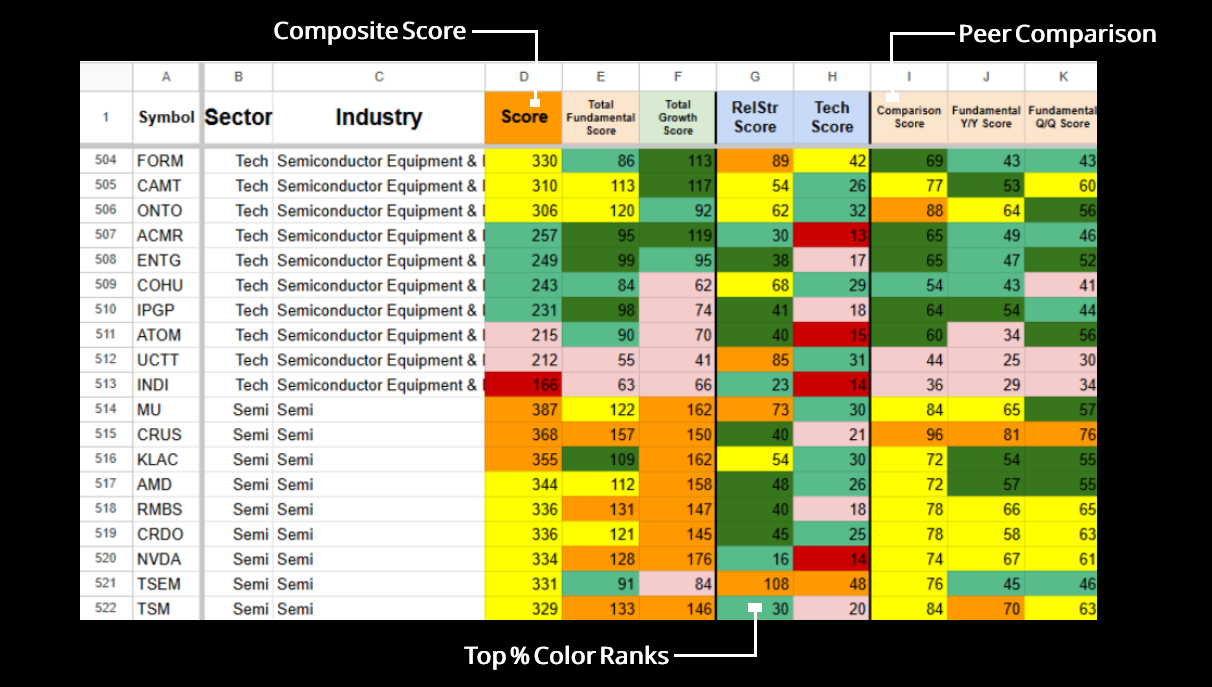
This image displays a detailed spreadsheet with columns labeled Symbol, Sector, Industry, and various numerical scores related to semiconductor companies. The scores are color-coded for quick analysis, with green indicating high scores and red indicating low scores.

Stock Performance Query

A table comparing DAVE, Tech, and Software scores, with weekly and monthly averages, percentage gains, and red/green color coding indicating performance changes.
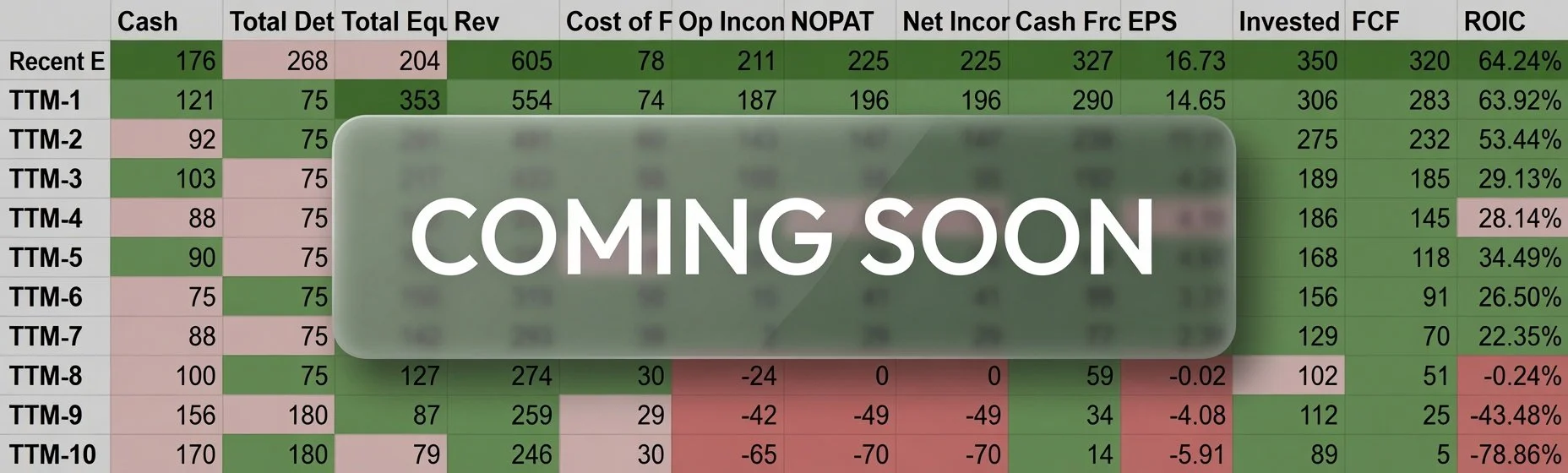
A spreadsheet with financial data including columns labeled Price, Cash, Total Debt, Total Equity, Revenue, Cost of, Operating Income, showing various figures in green, pink, and red.

Stock Deep Dive

…and many more

Watchlist Summary

Your daily command center with 2,300+ stocks. Get a clean, fully sortable dashboard featuring composite scores across Fundamentals, Growth, Technicals, and Relative Strength — plus built-in sector and industry comparisons that show exactly how each stock stacks up against its peers.

One-click Refresh updates everything with the latest data in seconds, while powerful filters and sorting options help you instantly spot the strongest opportunities every single day.

Table displaying data for industrial metal fabrication companies, with columns for symbol, sector, industry, score, fundamental score, growth score, rel strength, tech score, and comparison score. The scores are color-coded from red to green indicating performance.

Fundamentals

This section scores over 50 key financial health metrics — revenue, operating income, cash flow, assets, earnings, ROIC, margins, valuation ratios, and debt levels.

  • The Financials Score evaluates the stock on its own merits.

  • The Sector/Industry Scores show how it compares to its peers.

  • The Comparison Score focuses on relative performance against peers.

The result is a clear Total Fundamental Score that highlights whether a stock is fundamentally strong relative to others in its space.

A spreadsheet showing industrial marine shipping companies and their financial scores across various categories, with cells color-coded from red to green indicating score levels.
A table showing stock symbols, sectors, industries, and various financial metrics such as Growth Y/Y Q/Q scores, Fund Y/Y Growth, Value Y/Y Growth, Fund Q/Q Growth, and Value Q/Q Growth, with color-coded cells indicating different growth levels.

Technicals & Relative Strength

Clear momentum signals and performance context across multiple timeframes.

  • Scores percentage gains and price action across 7 different timeframes, awarding points when stocks meet predefined performance thresholds.

  • Compares each stock’s performance against major benchmarks (SPY, QQQ) as well as its own sector and industry.

The result is a straightforward Technical + Relative Strength Score that reveals whether a stock has genuine momentum or is simply moving with noise — and how it truly ranks relative to the broader market and its peers.

How the Scoring Works

Scores are built from simple, transparent measurements and smart comparisons:

  • Fundamentals — Revenue, operating income, cash flow, assets, and earnings (Y/Y and Q/Q), plus ROIC, margins, valuation ratios, and debt metrics — all measured against sector and industry averages.

  • Growth — Year-over-year and quarter-over-quarter trends in both fundamentals and valuation over the past 5 years.

  • Relative Strength — Direct comparisons against SPY, QQQ, the stock’s sector, and industry.

  • Technicals — Percentage gains across 7 timeframes that meet specific performance thresholds.

Everything is combined into clear composite scores with color coding, so strong performers stand out immediately.

Growth

Tracks real momentum across dozens of financial metrics.

This section measures year-over-year and quarter-over-quarter growth across key financials — revenue, operating income, earnings, and cash flow — plus valuation growth over the past 5 years.

  • Growth is evaluated both on the stocks own merits and in direct comparison to sector and industry averages.

  • Scores are not only based on if a company is growing in a positive direction, but also by how much.

  • True growth monsters will stand out among their competition.

The result highlights companies that are not just growing, but growing meaningfully relative to their peers.

A spreadsheet showing industry scores for different companies in the marine shipping sector, with columns for various scores and color-coded cells indicating performance levels.
A spreadsheet with columns for symbol, sector, industry, scores, financial metrics, growth, value, Q/Q scores, and price. The top row has headers in different colors, including orange for 'Score' and blue for 'Score' cells.

Full Dashboard View

Everything in one powerful, customizable workspace.

In total, you get 30 different metrics across 4 main groupings (Fundamentals, Growth, Technicals & Relative Strength) that combine into your ultimate composite score.

With the ability to sort and group by any column, you can quickly uncover deeper insights and build your own analysis directly inside the sheet.

This is where raw data gets refined into your personal trading edge.

How the Watchlist Summary Gives You a Real Edge

Are you buying a great dip — or catching a falling knife?

Am I chasing?

Where can I find undervalued stocks?

Which industry is truly breaking out right now?

Why is this Industry spiking?

Why is this stock up so much?

Am I buying a stock just becuase its up double digits?

Where can I find the laggards in a strong industry?

What is the strongest stock in the strongest industry?

Is this a value buy?

What stock has the best fundamentals in this industry?

Why is my stock not moving when the whole sector is ripping?

Is this stock actually strong… or just riding momentum?

How do I know if the fundamentals support this price move?

Are you buying a great dip — or catching a falling knife? Am I chasing? Where can I find undervalued stocks? Which industry is truly breaking out right now? Why is this Industry spiking? Why is this stock up so much? Am I buying a stock just becuase its up double digits? Where can I find the laggards in a strong industry? What is the strongest stock in the strongest industry? Is this a value buy? What stock has the best fundamentals in this industry? Why is my stock not moving when the whole sector is ripping? Is this stock actually strong… or just riding momentum? How do I know if the fundamentals support this price move?

  • Solution: Color-coded composite scores and direct peer comparisons show you instantly whether the move has real strength behind it or if the fundamentals are lagging.

  • Solution: Everything is combined in one clean dashboard with one-click refresh.

  • Solution: Integrated fundamental + technical + relative strength scores give you confidence to act on real opportunities.

  • Solution: Built-in sector and industry comparisons + the Industry Breakout Detector show you which groups are setting real trend breaks and which stocks inside them are leading or lagging.

  • Solution: The Watchlist Summary gives you fundamental reasoning alongside technicals, so you understand whether a stock is moving for good reasons or just following short-term momentum.

Semis are ripping. Am I too late?

Which havent gone yet? Which deserve to go but havent?

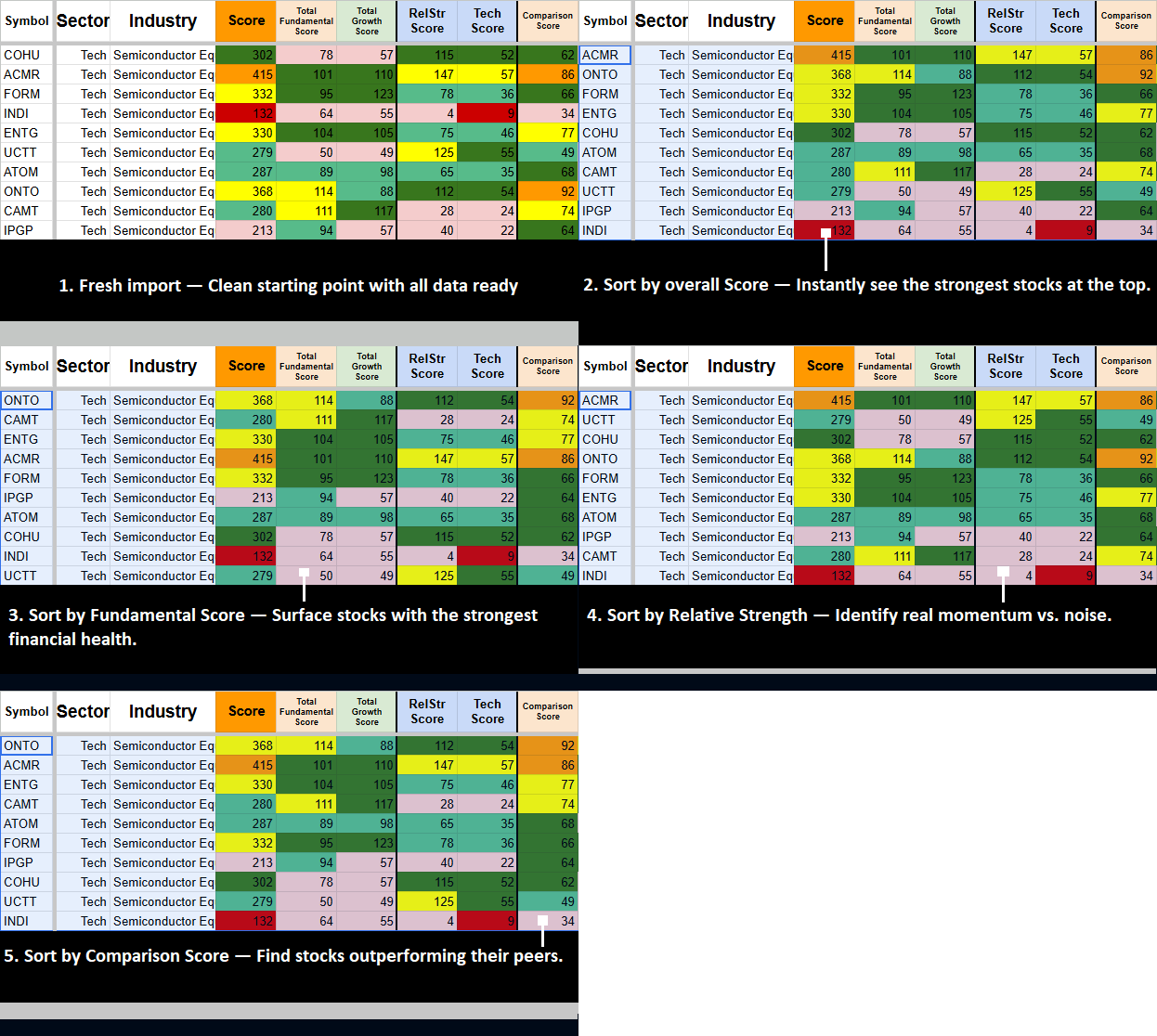
Sort the industry by Fundamental Score, see which stocks are weakest by looking at Relative Strength and Technical Score.

See which names still havent run and which are already extended.

Spreadsheet with columns labeled Symbol, Sector, Industry, Score, Total Fundamental Score, Total Growth Score, RelStr Score, Tech Strength Score. Rows list semi-truck symbols like CRUS, TSM, NVDA, and QCOM with associated scores color-coded in yellow, green, orange, red, blue, and purple.
A table ranking various industries and sectors based on scores in different categories, with columns for symbol, sector, industry, score, total fundamental score, total growth score, RelStr score, and Tech score. The scores are color-coded from red (low) to green (high).

Industry has been HOT for too long and you want short?

You want to short the Pigs. Which are the most 0ver extended? Which have the worst fundamentals?

Sort by highest Relative Strength, find the weakness.

Find stocks that are the most over priced, over hyped.

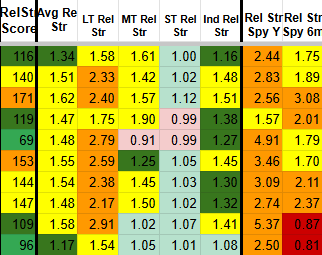
Spreadsheet table with columns labeled Symbol, Sector, Industry, LT Rel Str Score, MT Rel Str Score, ST Rel Str Score, LT Performance Score, MT Performance Score, ST Performance Score, and Score. Rows list various industries with color-coded scores indicating performance or ratings.

Want to find the fastest growth stocks in the market?

Companies that havent reflected that growth in price?

Sort by highest Growth score, and spot the lowest Rel Str and Performance scores.

These are the stocks with strong fundamentals that the market hasn’t fully priced in yet.

The market is weak — where are the strong investments?

You want to find good investments. Cheap valuation, Strong fundamentals.

Sort by Tech Score, spot the high Fundamental scores.

Find quality stocks that are holding up or setting up on accumulation.

Spreadsheet with columns labeled Symbol, Sector, Industry, Score, Total Fundamental Score, Total Growth Score, RelStr Score, Tech Score, and colored cells indicating scores for various companies in different sectors and industries.

Trend Trader looking for strong stocks moving into consolidation?

Want to find the strongest names that are having a short term pullback / consolidation period?

Sort by Long Term Rel Str/Long Term Performance Score and spot the lower Middle Term/Short Term Scores.

See which names have the strongest moves in the year, and have paused to catch a breath.

A detailed table showcasing various sectors, industries, and their respective scores in different categories such as Total Growth Score, RelStr Score, Tech Score, LT Rel Str Score, MT Rel Str Score, ST Rel Str Score, LT Performance Score, MT Performance Score, and ST Performance Score. The table includes symbols, sectors, industries, and numerical scores highlighted with different colors indicating performance levels.
A spreadsheet table displaying various sectors, industries, scores, and comparison metrics. Highlights include health, biotech, materials, tech, utilities, semi, and industrials, with scores ranging from 231 to 389.

Find stocks crushing their competition.

Who is top dog?

Find stocks with edge over their peers sorting by comparison score and technical score.

Instantly see which stocks are outperforming their peers on multiple dimensions.

Spreadsheet highlighting waste management industry data in columns A to W with scores in green, yellow, red, and gray cells; a refresh button overlay in the right center.

The sorting tool is limitless. Test all your ideas, sort by any score, and instantly find the stocks that actually match what you’re looking for — whether you want strong fundamentals on weakness, hidden momentum plays, or the best names inside the hottest industries. Create your own personalized watchlist based on real scores that reflect what’s actually happening in the market.

Tools

The Watchlist Summary is your daily command center.

These focused add-on tools give you deeper power where you need it most — all with the same one-click refresh.

Start with the Watchlist Summary. Then layer on any add-ons that match your trading style. Each tool works independently or together, stays fast and sortable.

-

Industry Strength Rankings

-

Industry Performance Rankings

-

Watchlist Performance Tracker

-

Watchlist Relative Strength

-

Stock Deep Dive Analyzer

-

Stock Momentum Query Tool

-

Market Sentiment Dashboard

- Industry Strength Rankings - Industry Performance Rankings - Watchlist Performance Tracker - Watchlist Relative Strength - Stock Deep Dive Analyzer - Stock Momentum Query Tool - Market Sentiment Dashboard

See all Add On Systems in detail below.

Industry Strength Rankings

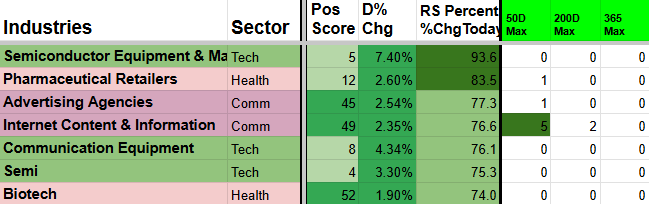
Industry Strength Rankings gives you a clear daily view of every major industry’s true momentum and breadth. It combines participation (how many stocks are moving together), short-term and long-term momentum, and multi-timeframe trend signals into easy-to-read Positive vs Negative scores and breakout/breakdown alerts.

Instantly see which industries are gaining real power and which ones are weakening so you can rotate into the strongest groups.

A spreadsheet showing industries in different sectors with various performance metrics, including positive and negative changes, percentages, and color-coded data. Sectors include utilities, tech, semi, and RE.
A financial chart displaying various industry sectors with color-coded performance metrics, including positive and negative changes in percentage, and risk scores.
  • Daily rankings of industries by Positive Strength Score (bullish breadth + momentum) versus Negative Score (bearish pressure)

  • Highlights industries hitting new highs or breaking above short-term averages across 5D, 20D, 50D, 200D, and 365D timeframes

  • Fully sortable and color-coded for instant clarity

  • One-click refresh keeps the data live every day

How the Scoring Works

The tool calculates industry averages from the Watchlist Summary and Industry log sheets. It awards positive points when an industry beats its 5-day or 20-day average, and negative points when it falls below. Extra points are given for hitting new highs or lows on the 20D, 50D, and 365D timeframes. It also incorporates relative strength and Finviz breadth data.

It tracks market internals and includes built-in breadth charts so you can visually spot highs and lows in market participation

Table showing dates with the most queries. Columns: Dates, Queries in first column, and other columns with recent dates and query counts.

Visual Comparison

Below is AAPL’s daily chart from the day the query was run (top), along with charts of AAPL on the dates that appeared most frequently across all the queries.

This side-by-side view lets you visually compare the current setup with the most common historical matches.

Industry Performance Rankings

A different view of looking at Industry Strength. Scores based on Watchlist Summary Performance and Relative strength.

See Industry Scores from a simpler, yet holistic performance point of view.

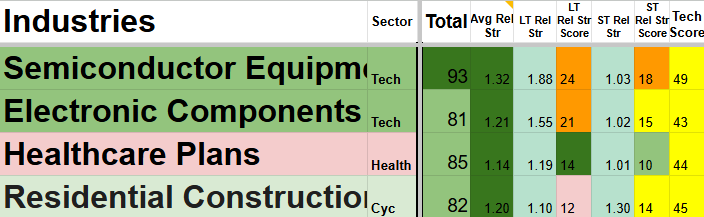
Table comparing industry scores of companies: Airlines, Semi, Semiconductor Equipment, Luxury Goods, Travel Services, Residential Construction with sector, tech, LT rel, MT, ST, and total scores.

Once the symbol is entered, the sheet instantly updates across multiple sections. The first major update is a comprehensive Quarterly and TTM year-over-year growth matrix covering key variables such as Cost of Revenue, Gross Income, Net Income, ROIC, and many others. Everything is color-coded so you can immediately see whether fundamentals are improving or deteriorating — and by exactly how much.

  • Daily rankings of industries by overall performance and momentum

  • Shows strength across multiple timeframes with clear winners and underperformers

  • Incorporates relative strength against the broader market and sector peers

  • Fully sortable and color-coded for instant clarity

  • One-click refresh keeps the data live every day

Use it with the Watchlist Summary and Industry Strength Rankings to quickly identify the best sectors for new trades and avoid the weakest ones.

What You Get:

  • Daily performance tracking across multiple timeframes (% gains/losses)

  • Relative strength comparisons against SPY, QQQ, sector, and industry

  • Clear rankings of your personal picks by momentum and leadership

  • Color-coded, fully sortable views

  • One-click refresh on both tools

Watchlist Performance & Relative Strength

Instantly see which stocks are leading and lagging and by how much.

This pack combines two essential tools into one seamless system. You get full Watchlist Performance Tracking (how your stocks are actually doing over time) plus Watchlist Relative Strength (how they compare to SPY, QQQ, their sector, and industry). Together they show you real momentum and leadership — not just raw price moves.

A spreadsheet showing steel industry data with categories such as sector, industry, score metrics, and prices, highlighted by color-coded cells indicating different score ranges.
Table of industry sectors with various financial and performance metrics, including RelStr score, LT RelStr Score, MT RelStr Score, ST RelStr Score, Price, and relative strength rankings in green and red cells.

Market Sentiment Dashboard

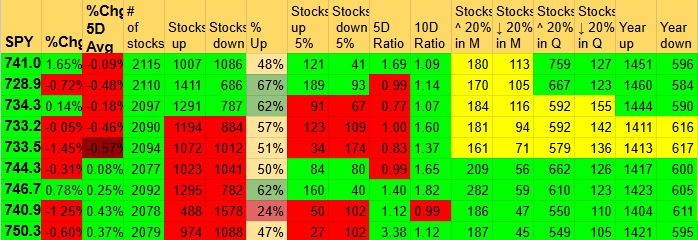
Market Sentiment Dashboard gives you a clear daily view of overall market psychology, breadth extremes, and internal health.

Spreadsheet displaying data with columns labeled from A to AD, rows numbered from 1 to 16. The headers include categories like FANGMANT, MEGA Cap, and BIG Tech. Cells contain numbers and percentages, with some cells highlighted in green for positive values and red for negative values.

Spot when the market is approaching historical tops and bottoms on multiple different breadth data points.

What You Get:

  • Historical queries across daily, weekly, monthly, quarterly, and yearly moves

  • Clear win rates and success probabilities for each timeframe

  • Average returns, best-case, and worst-case outcomes

  • Gain/loss analysis for every matching historical setup

  • Weighted averages that prioritize larger sample sizes

Yes its a strong Industry, but for how long? Is it a new breakout? Is it a false breakout? Does breadth support it?

ISR will show you the deeper answers, rather than looking at a single percentage point.

A detailed table showing various industries and sectors with columns for positive and negative scores, percentage changes, and other statistical data, color-coded with green, red, and blue highlights.
A financial trading report table showing various metrics such as percentage increases, averages, and other statistics for stock or trading data over different days and timeframes.

Color Coding

  • Light green — Strength improved from yesterday

  • Dark green (5D/20D)— At or near maximum strength (max points or just 1 off)

  • Dark green (50D/200D/365D) — 4+ new highs or 33%+ of points hitting new longer-term highs

  • Orange (50D/200D/365D) — Half the possible points are at all-time highs or lows (extreme move)

One-click refresh. Fully sortable. Use it with the Watchlist Summary to focus on the strongest industries.

Stock Performance Query

Quickly answer “What usually happens next?” using real historical data from similar setups.

This powerful tool lets you type any stock ticker and instantly see how similar technical setups performed in the past. It runs deep historical queries across multiple timeframes and conditions to deliver actionable insights.

Spreadsheet comparing stock data with metrics such as Total Growth, Rel Strength, Technology Sector, Industry Sector, and Growth. It includes stock symbols, scores, and historical dates in a table format.
A table showing frequency, percentage, and various statistical metrics with color-coded cells: green for positive values, red for negative values, and yellow for moderate. Contains columns labeled Frequency, %, G nxt, AVG, Count, and different metrics like Q, W, M, and MFE W.
Stock market chart displaying candlestick patterns, moving averages, and volume profile on a black background.
Stock market chart showing upward trend with candlestick patterns, moving averages in pink, and volume profile on the right side.

Bottom Line:

The Stock Performance Query turns historical data into a clear statistical edge. Instead of guessing whether a setup is good, you can instantly see how the stock has performed in nearly identical situations in the past — complete with win rates, average returns, and realistic risk levels (MAE).

It’s one of the most powerful ways to validate trade ideas and increase your confidence before putting capital at risk.

Use it alongside the Watchlist Summary to make smarter, data-backed trading decisions.


The Stock Deep Dive Analyzer turns any single ticker into a complete, pre-built professional research workstation with 100+ interconnected sheets so you can instantly analyze every angle of a stock without starting from scratch.

What You Get

  • Comprehensive scoring overview pulled from your Watchlist Summary (Total Score, Fundamentals, Growth, Technicals, Relative Strength) plus sector/industry context and current Industry Strength Ranking.

  • Quarterly and TTM year-over-year growth matrices with color-coded performance so you instantly see whether fundamentals are improving or deteriorating — and by how much.

  • Earnings reaction tracker: Enter past earnings dates once and see exact post-earnings price performance (Gap Day +1 through +80) with beat/miss percentages and average, max, and min results.

  • Quick peer comparison table — enter up to 4 closest competitors and automatically populated valuation, profitability, and ownership metrics.

  • Full fundamental matrix (last 20 quarters + TTM) with color-coded streaks, industry averages, and built-in charts for Cash from Operations, ROIC, EPS, FCF%, and more.

It begins with entering the symbol and most recent Gap Date or Date of Interest,

Screenshot of a financial table showing stock market data, including ticker 'tw', sector 'Finance', industry 'Capital Markets', sub industry 'Market', and metrics like % change, date, market cap, ATR, and average volume.

which gives you the stocks Watchlist Summary score, and average Industry Score, along with a Relative Strength Box and current Industry Strength Ranking scores.

A table displaying quarterly financial data with percentages, color-coded in green for positive and red for negative values, spanning from the second quarter of 2020 to the fourth quarter of 2023.
A spreadsheet displaying percentage values for different quarters (Q-1 to Q-20) and various unnamed categories, with cells color-coded in green for positive percentages, red for negative percentages, and pink for zero or near-zero values.

Once the earnings dates are entered, the price reaction column auto-fills for additional insight. You can instantly see how the stock price responded to each release — positive or negative surprises — with % surprise values entered manually by you.

A financial spreadsheet displaying data such as stock prices, financial metrics, and performance indicators. The spreadsheet uses color coding (green for positive, red for negative) to indicate performance trends across different periods or assets.

Metrics that earn points

1D, 20D, Weekly %, Monthly %, Quarterly %, 6M %, Yearly %, 52Wk High, Today Up %, Above 50%, 20D High, 20% Up on Monthly Avg, Avg Rel Str, LT/MT/ST Rel Str, plus Finviz breadth and participation.


Instantly see which industries are leading or lagging the market across multiple timeframes.

Table showing various industry sectors with metrics related to Semiconductor Equipment, Aluminum, Semi, Electronic Components, Trucking, Communication Equipment, Other Industrial Metals, Luxury Goods, Copper, and Electrical Equipment. Metrics include Tech Score, LT Score, MT Score, ST Score, and others, with color-coded cells indicating different levels of performance or risk.

How the Scoring Works

The tool pulls live data from the Watchlist Summary and calculates industry-level performance using percentage changes, relative strength metrics, and ratio comparisons. Higher Total Scores indicate stronger industries; lower scores highlight weaker ones.

Industry Performance Rankings gives you a clear daily view of which industries are truly leading or lagging the market. It combines raw percentage gains, relative strength comparisons, and key ratio performance into one easy-to-read Total Score for every major industry.

A table of industry data with categories such as Insurance Brokers, Airport & Air Services, Consulting Services, Thermal Coal, Auto & Truck Dealership, Business Equipment, and Home Improvement Retail. The table includes various metrics and ratios with color coding, showing performance or statistics for each industry.

Different sorting styles allow for difference strength gaugues.

Sort by ST Performance score to see the industries where the stocks had the greatest ST % Gains.

Sort by ST Rel Str score to see the industires where the stocks had the greatest outperformance relative to their sectors / peers / SPYder ETFs.

Sort by LT Scores to see the industries that are performing/holding the best during market drawkdowns.

Combinations are limitless

A spreadsheet displaying multiple industry sectors with various numerical scores across different categories, including Airlines, Health Information Services, Broadcasting, Internet Content, Uranium, Staffing & Employment, Semi, Other Industrial Metals, and Software Infrastructure, with color-coded cells indicating different score ranges.

Spreadsheet showing industry scores, relative strength rankings, and color-coded performance data for various sectors.
Table showing various industry performance data including sectors, industry names, tech scores, chart scores, performance scores, prices, and growth percentages with some cells highlighted in green and red.

Ideas to Use It:

  • Quickly see which of your watched stocks are actually outperforming the market (and which are just riding the wave)

  • Spot hidden leaders that are strong on relative strength even if short-term performance looks flat

  • Identify laggards in your list that are dragging down your returns

  • Use it daily to refine your watchlist — keep the winners, drop the weak ones

  • Perfect for swing traders and investors who want to focus on stocks with both good performance and real relative strength


A detailed spreadsheet with financial data, including dates from April 17 to March 31, stock symbols, percentage changes, and performance metrics, color-coded in green and red for positive and negative changes.

Frequent Days

After running all 25+ queries, certain dates appear more frequently than others across the different metrics.

This section highlights the most common historical dates that matched your current setup. The table shows:

  • How many times each date appeared across all queries (higher count = more significant)

  • The average performance when the stock hit those frequently matching dates (win rates, average returns, MFE, and MAE for the next week, month, and quarter)

It essentially gives you an “average of the averages” — a powerful summary of what happened on the dates that most closely resembled the current setup.

This helps you see the strongest recurring patterns and provides an extra layer of confirmation for your trading decision.

Stock Deep Dive

A financial table displaying various stock metrics for different companies and indices. Columns include Market Cap, Revenue, Income, P/E ratio, Forward P/E, P/S ratio, P/FCF, EV/EBITDA, EV/Sales, EPS, EPS N xY, EPS Y/Y, Sales Y/N, EPS Support, Ins Own, Inst Own, ROIC, Profit Margin, SMA20, SMA50, 52WHi, 52WLo, RSI, PerfW, PerfM, PerfQ. The table presents numerical data and percentage changes for each metric.

At the bottom of the sheet you’ll find a comprehensive fundamental matrix covering the last 5 years (both quarterly and TTM). It’s color-coded to highlight streaks of improvement, with dark green marking the maximum value in each column and industry averages shown in the top row.

Multiple financial charts showing stock market data over different time periods and metrics, including number of stocks, 20% monthly change, year-to-date increase, and ratios, with line graphs and color-coded lines for up and down trends.

Shows running daily performance % changes for FANGMANT, Mega Caps, Big Tech, SPYders, and all major sectors. (Averages for every group except FANGMANT are based on the 20 largest stocks in that category.)

Line graphs showing percentages above three different simple moving averages (20, 50, 200 days) with data plotted over time, including two separate charts for percentages above SMAs and SMAs.
Spreadsheet with data cells highlighted in green, red, and gray, representing different values or categories.
Six line graphs displaying data trends with labels '20D Hi', '50D Hi', '52Wk Hi', '20D Lo', '50D Lo', and '52Wk Lo'.

Use it with the Watchlist Summary and Industry tools to understand the broader market environment and improve your timing for entries and exits.

Another powerful section is the quick peer comparison. Enter the symbols of the stock’s four closest peers and the table auto-fills with key valuation, profitability, and ownership metrics. You can instantly see how your stock stacks up against the competition.

Whether you’re confirming a buy, stress-testing a position, or building a full investment thesis, the Deep Dive turns hours of manual work into minutes of high-level insight.

Ready to Build Your Stock Score System?

You now have everything you need:

  • Flagship Watchlist Summary — Your daily command center with 2300+ stocks, composite scores, sector/industry comparisons, and one-click Refresh

  • Simple one-click tools — Industry Strength & Performance Rankings, Market Sentiment Dashboard, and Watchlist Performance & Relative Strength Pack

  • Advanced Research Suite — Stock Deep Dive Analyzer & Stock Momentum Query Tool — go from quick overview to full institutional-grade research and momentum scanning on any ticker

Mix and match however you want. Every tool is built to work together seamlessly with the easy Refresh system.

If you’ve ever been looking for one-symbol entry and one-click analysis this is it.

See right when the market is making large changes in character.

On the left is AAPL’s recent price history, highlighting the specific 1-day move being analyzed (+1.04% on 4/20).

This is the metric the queries use as their starting point. The tool scans the stock’s entire history and finds every past instance where AAPL had a very similar 1-day percentage change — along with matching patterns across other key timeframes (5D, 10D, 20D, weekly, monthly, etc.).

The Stock Momentum Query Tool analyzes over 25 different historical query metrics across five specialized query sheets.

Each query calculates the probability of the stock closing higher (green) over the next day, week, month, and quarter — along with average % gain/loss, overall average return, Maximum Favorable Excursion (MFE), and Maximum Adverse Excursion (MAE).

These results are then combined and weighted by sample size to produce a clear, data-backed probability score for each timeframe.

Example: If the query shows an 80% chance of closing green next week based on 40 similar historical setups, that’s a strong, high-probability signal you can use to make more confident trading decisions.


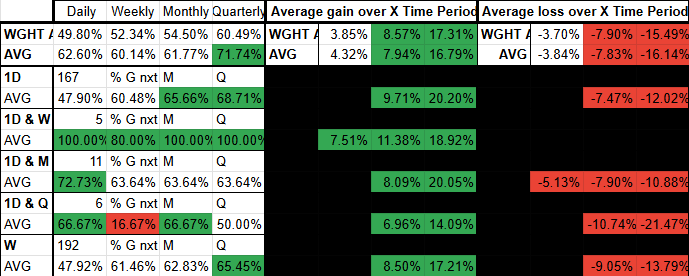
Screenshot of a financial performance table with data on daily, weekly, monthly, and quarterly metrics. The table includes columns for average gains, losses, returns, and various percentages, with some cells highlighted in green for positive growth and red for losses.
Stock analysis spreadsheet with financial metrics like stock price, cash, total debt, net income, earnings per share, ROIC, ROC, FCF%, and profit percentages. Charts display trends for revenue, ROIC, FCF%, EPS, cost of revenue, and debt over various quarters.

What am I looking at?

The left column shows the specific metric being queried.

For this example, AAPL had a 1.04% 1-day gain, and the tool found 199 similar historical instances.

Of those 199 days:

  • It closed green the next day 51% of the time

  • Next week 60%

  • One month later 67%

  • One quarter later 72%

When green, the average return was +8.09% (1 month) and +8.57% (1 quarter). Average Maximum Favorable Excursion (MFE) was +16.10% and Maximum Adverse Excursion (MAE) was -6.93% over the quarter.

The top row shows simple averages and weighted averages (which give more importance to queries with larger sample sizes).

This data gives you clear, quantitative risk/reward levels. For example, knowing AAPL’s average MAE is around -8% over the next quarter helps you set smart stop-loss points and assess whether the trade offers a favorable edge.

A financial table showing performance metrics with columns labeled Daily, Weekly, Monthly, Quarterly, and averages over different periods. It includes data points for WGHT, AVG, and 1D, with percentages and color-coded cells indicating gains, losses, and other statistics.
A financial chart featuring price movements, moving averages in pink, and volume profile on the right side, showing stock or cryptocurrency trading activity.
A detailed table with various financial and industry performance metrics, scores, and rankings, highlighted in different colors for type categories such as Growth, Fund, and Industry.

Once the symbol is entered, add the previous earnings dates in the designated section (optional 90-day subtract formula available for quick autofill, though slightly less accurate).

When those dates are populated, the earnings reaction tracker auto-fills with post-earnings performance: top row shows % of green days, followed by Gap Day +1 through +80 price moves, with Average, Maximum, and Minimum results at the bottom.

Table showing recent dates, beat percentages, gap days, and prices for Q-1 to Q-20 from 2022 to 2023 with varying percentages and prices.
Screenshot of a stock trading spreadsheet with various data columns, including stock prices, percentages, and volume, alongside two blue line graphs showing stock activity over time.